Mahoning County court docket records provide case timelines, hearing dates, filing details, motions, judgments, and courtroom activity for civil, criminal, probate, traffic, and family matters. Public docket data helps residents, attorneys, reporters, and researchers review pending cases, monitor court proceedings, and check scheduled appearances within the local court system. Online docket search tools save time by showing case status updates, party names, court dates, and document entries from different divisions across Mahoning County courts in Ohio.
Mahoning County docket information gives users a simple way to check court calendars, trial schedules, hearing notices, and recent filings connected to active or closed cases. Court dockets contain records related to lawsuits, criminal charges, probate matters, small claims disputes, and other legal proceedings handled by county courts. Search systems often include case numbers, filing dates, judicial assignments, and courtroom actions that help users review court activity without visiting the courthouse in person.
How to Search the Mahoning County Court Docket
Mahoning County court docket search works through the official eCourts system, where users can look up case records using names, case numbers, or court filters. The system displays civil, criminal, and other court case details including hearings, filings, and status updates. It acts as a public judicial records platform for tracking case activity in Mahoning County courts. Users can view docket entries, case timelines, and court schedules through a structured online database built for public case monitoring.
Open the Mahoning County eCourts Search Portal
The search process begins by opening the official Mahoning County eCourts portal, which serves as the main entry point for court docket records. This platform contains all searchable case data linked to the county court system. Users can open the search page directly and choose different search options based on their case type or available information. The system is designed to pull records from the court database and display them in a structured format for public review.
Official link: https://ecourts.mahoningcountyoh.gov/eservices/search.page.4.1
Select Search Method
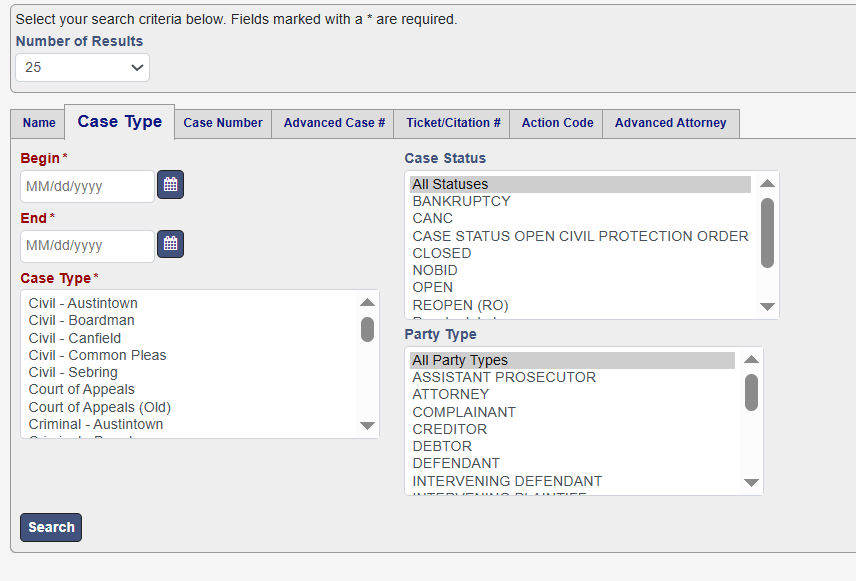
After opening the portal, users must select a search tab that matches the available case information. Each tab filters results differently and helps locate records faster. The system provides multiple search methods such as name-based lookup, case number search, and ticket or citation search. Choosing the correct tab reduces irrelevant results and improves accuracy when working with Mahoning County court docket records and other legal database search tools.
- Name Search for individuals or parties
- Case Number for direct lookup
- Case Type for court divisions
- Ticket/Citation for traffic cases
- Attorney Search for legal representation records
Enter Case Details in Search Fields
Once the search method is selected, users must enter available case details into the required fields. These fields may include party names, case numbers, or filing dates, depending on the selected tab. The system also allows filtering by court division and case status, which helps narrow results. Accurate input increases the chance of finding correct docket records that Ohio courts maintain in their online judicial records system used for case tracking and legal research.
- First and last name
- Case number
- Filing date range
- Court division selection
- Party type filters
Run the Search
After entering the required details, users click the search button to retrieve matching results from the Mahoning County court database. The system processes the request and shows a list of cases that match the entered criteria. Each result includes basic case information such as names, case type, and status. If no results appear, users can adjust spelling, remove filters, or try a broader search to improve matching within the docket tracking system.
Open Case and View Docket Information
Users can select any case from the results to view full docket information. Each case page contains detailed records such as filings, court hearings, motions, and judicial actions. It also shows party names, judge assignment, and case history in a structured format. This section serves as the main record for public case monitoring, allowing users to review how the case has progressed through the Mahoning County court system over time.
Read Docket Entries and Case Timeline
Docket entries show a chronological record of everything that happens in a case from filing to final judgment. Each entry reflects a specific court action, such as motions, hearings, or rulings. Users can scroll through the timeline to understand how the case developed. These entries help explain the legal process step by step and show important updates recorded by the court in the Mahoning County judicial records system.
- Complaint filed
- Hearing scheduled
- Motion submitted
- Continuance granted
- Judgment entered
- Case closed
Track Updates in the System
The Mahoning County court docket system updates records whenever new court actions occur. Users can revisit the portal to check new hearings, filings, or status changes. This is useful for tracking ongoing cases where court activity changes frequently. Regular monitoring helps users stay informed about legal proceedings, including schedule changes, rulings, or new motions added to the case file within the online judicial records database.
- Hearing updates
- Case status changes
- New filings or motions
- Court rulings
- Rescheduled dates
How to Search Court Dockets by Name or Case Number
Court docket search can be completed using either a party name or a case file search method through the official court database. The system allows users to view docket entries, lookup results, case status updates, court records, hearings, and filing history. Name-based search shows all cases linked to a person, while a court case identifier gives a direct match. Both methods help users track legal activity through structured public court records in Mahoning County.
Name-Based Docket Searches
A party name search lets users find court records by entering a first and last name into the system. The database then pulls all related civil, criminal, or traffic cases linked to that individual. This method is useful when a legal identification number is not available. It may return multiple results, especially for common names, so filters like case type or filing year help narrow down records in the court file lookup system.
- Search by full name or partial name
- Review multiple case matches
- Use filters for case type or status
- Check party role (defendant, plaintiff, attorney)
Case ID Lookup for Direct Results
A case file search using a court case identifier provides the fastest way to locate exact docket records. Each case in the system has a unique identification number linked to filings, hearings, and court actions. Entering this number removes the need for name filtering and reduces unrelated results. This method is widely used for checking precise case status updates court records and reviewing complete docket entries lookup data without searching through multiple entries.
- Enter full case number for accuracy
- Directly opens single case record
- Shows complete case timeline
- Includes filings, motions, and rulings
- Reduces irrelevant search results
Advantages of Docket Number Searches
Using a court case identifier instead of a name search improves accuracy and saves time. It connects directly to a single record, making it easier to track docket entries lookup history and review legal updates. This method is preferred in legal research, court monitoring, and official case verification. It also reduces confusion caused by duplicate names and ensures users view the correct case file without mixing unrelated records in the system.
- Faster and more precise results
- Avoids duplicate name confusion
- Direct access to full case file
- Better for legal tracking and research
- Shows complete case history in one view
Types of Cases Available in Docket Search
Mahoning County court docket systems provide different case categories through docket records in Ohio databases, covering criminal, civil, traffic, probate, and domestic relations matters. Each category shows case activity, filings, hearings, and status updates inside the Mahoning County court docket system. Users can view court schedules, hearing progress, and legal actions based on the selected case type. These categories help organize court proceedings records so users can quickly locate the correct judicial information.
Criminal Cases
Criminal docket records include cases involving charges filed by the state against individuals or groups. These records show arrests, arraignments, motions, trials, and sentencing updates within the court system. Users reviewing criminal cases can track case activity updates, court records, including plea hearings, and final judgments. Criminal dockets are commonly used for background checks, legal research, and public safety monitoring within Mahoning County court proceedings.
- Felony and misdemeanor cases
- Arraignment and trial hearings
- Sentencing and probation updates
- Motion filings and rulings
- Case status changes
Civil Cases
Civil court schedules cover disputes between individuals, businesses, or organizations that do not involve criminal charges. These cases include lawsuits, contract disputes, property issues, and monetary claims. Civil docket records show filings, motions, hearings, and judgments within the Mahoning County court docket system. Users often check civil case progress to monitor court activity updates and review how disputes move through legal process stages in county courts.
- Contract disputes
- Property and injury claims
- Small claims cases
- Court hearings and motions
- Final judgments
Traffic Cases
Traffic court calendar records include citations, violations, and driving-related offenses handled by municipal or county courts. These cases often involve speeding tickets, license issues, and traffic violations. The docket system shows hearing dates, fines, and case outcomes under docket records Ohio databases. Users can track court proceedings records related to traffic matters and check updates on payments, penalties, or scheduled hearings.
- Speeding and violation tickets
- License suspension cases
- Court hearing dates
- Fine and penalty updates
- Case resolution status
Probate Cases
Probate hearing records involve estate administration, wills, guardianship, and related legal matters after a person’s death. These cases are handled through specialized court divisions and appear in the Mahoning County docket system with scheduled hearings and filings. Probate records show case progression, appointment of executors, and estate distribution updates. Users review these records for legal process stages involving inheritance and family estate matters.
- Estate administration cases
- Will validation hearings
- Guardianship filings
- Asset distribution records
- Court-approved estate actions
Domestic Relations Cases
Domestic relations cases cover family-related legal matters such as divorce, child custody, child support, and spousal support. These cases appear in the mahoning county court docket with scheduled hearings, motions, and final orders. The docket records show how family disputes move through court proceedings records and reflect updates in custody arrangements, support orders, and settlement decisions within the legal system.
- Divorce proceedings
- Child custody hearings
- Support order modifications
- Visitation schedules
- Final family court judgments
Docket Entries and Court Timeline
Court docket entries show a complete court timeline that records every legal action from filing to final decision. Mahoning County court records use these entries to build a structured case chronology, including hearings, motions, rulings, and status changes. Each entry works as a legal event record inside the court proceedings records system. This helps users follow how a case moves through each stage, from initial filing to judgment, within the official docket entries lookup system.
Filing Entries (Case Start Records)
Filing entries mark the beginning of a case inside the court system. These records show when a complaint, petition, or charge is officially submitted to the Mahoning County courts. Filing entries create the base of the procedural history and assign a case number for tracking. They also identify parties involved and set the initial case type. These records act as the starting point of the entire court timeline and help structure all future legal activity.
- Complaint filed date
- Case file creation
- Party identification (plaintiff/defendant)
- Case classification (civil, criminal, etc.)
Scheduled Hearings (Court Appearance Timeline)
Scheduled hearings form the active stage of the court timeline, where parties appear before a judge. These entries show hearing progression, such as arraignments, motion hearings, pretrial conferences, and trial dates. Each hearing record includes time, courtroom, and judge assignment. These legal event records help users track upcoming court proceedings and understand how the case is progressing through the system based on scheduled judicial actions.
- Arraignment hearings
- Motion hearings
- Trial dates
- Pretrial conferences
- Sentencing hearings
Continuances (Rescheduled Court Events)
Continuances occur when a court hearing is postponed or moved to a later date. These docket entries update the case chronology and adjust the court timeline based on legal requests or court decisions. Continuances may happen due to attorney availability, evidence review, or scheduling conflicts. Each entry records the reason and new hearing date, helping maintain an accurate procedural history inside the Mahoning County court proceedings records system.
- Hearing postponed
- New court date assigned
- Reason for delay recorded
- Updated schedule reflected in the docket
Judgments (Final Court Decisions)
Judgment entries represent the outcome of a case and mark a major point in the court timeline. These records show whether a case was dismissed, ruled in favor of one party, or resulted in sentencing. Judgment entries form the final section of the procedural history and confirm the court’s decision. They are critical for legal reference, background checks, and reviewing completed docket entries and lookup records.
- Case dismissal
- Guilty or not guilty rulings
- Civil judgments
- Sentencing decisions
- Case closure status
Court Orders (Judicial Instructions and Rulings)
Court orders are official instructions issued by a judge during or after hearings. These entries may direct parties to take specific actions such as paying fines, submitting documents, or following legal conditions. Court orders shape the direction of a case and become part of the legal event records within the docket system. They often appear throughout the court timeline and influence how the case progresses in Mahoning County proceedings.
- Motion approvals or denials
- Payment or compliance orders
- Custody or restraining instructions
- Evidence submission requirements
- Case management directives
Mahoning County Hearing Schedules & Trial Calendar
Mahoning County hearing schedules show the planned court dates for active cases, including motions, pretrial sessions, and trials listed in the official Mahoning County court docket system. The trial calendar organizes these dates into a structured judicial event calendar used by courts to manage courtroom time. Users can view upcoming hearings through a court date tracker that displays case timing, judge assignments, and courtroom details. These records help track case movement across different court stages in a clear schedule format.
How Hearing Schedules Work
Hearing schedules in Mahoning County courts are created after a case is filed and assigned to a judge. Each case receives specific dates for hearings based on court availability, case type, and procedural requirements. The court updates these schedules through a courtroom scheduling system that organizes daily and weekly hearings. These listings appear in the Mahoning County court docket and show when parties must appear for motions, arraignments, or review sessions during the case process.
- Hearings are assigned after filing
- Dates set by the judge or the court clerk
- Updated if rescheduled or delayed
- Displayed in the public docket system
- Linked to case progress stages
Trial Calendar Explanation
The trial calendar lists all scheduled trials in Mahoning County courts within a structured time frame. It shows when jury trials, bench trials, and final hearings are set to occur. This judicial event calendar helps attorneys, defendants, and the public track upcoming trial dates across civil and criminal divisions. Each entry connects directly to the court docket system and reflects the final stage of case scheduling before judgment or resolution in the legal process.
- Jury trial dates
- Bench trial schedules
- Case grouping by court division
- Judge and courtroom assignment
- Trial status updates
Public Accessibility of Hearings
Most hearing schedules and trial calendars in Mahoning County are part of public court records and can be viewed through the online docket system. This court date tracker allows users to check upcoming hearings, case status updates court records, and courtroom assignments. However, some hearings, such as sealed, juvenile, or restricted cases may not appear in public listings. The system provides transparency while still following legal privacy rules for sensitive matters.
- Public viewing of most hearings
- Online docket availability
- Limited access for sealed cases
- Real-time updates for schedule changes
- Search by name or case number
Case Status Updates and Court Proceedings
Case status updates in Mahoning County court records show whether a case is active, pending, or closed within the court proceedings system. These status labels help users follow pending litigation, court activity updates, and legal process stages from filing to final judgment. Each update appears in the Mahoning County court docket and reflects the current position of a case in the judicial system. Users rely on these status changes to track progress and review ongoing or completed matters.
What “Active,” “Closed,” and “Pending” Mean
Court case statuses explain the current stage of a legal matter. An active case means hearings, filings, or motions are still in progress. A pending case means it has been filed but not fully resolved or scheduled for final judgment. A closed case means the court has completed all proceedings and issued a final decision. These labels help users quickly understand case status updates without reviewing full docket entries or detailed court records.
- Active: Ongoing hearings or filings
- Pending: Filed but not resolved
- Closed: Final judgment issued
- Updated after each court action
- Shown in docket summary view
Monitoring Ongoing Cases
Ongoing cases require regular review of court proceedings and docket updates. Users track changes through case status updates court records, which show new filings, hearing dates, and rulings. The system updates whenever court activity occurs, making it easier to follow pending litigation without visiting the courthouse. Attorneys, researchers, and the public often check these updates to stay informed about changes in legal process stages and upcoming court actions.
- Check docket entries regularly
- Track hearing reschedules
- Monitor new motions or filings
- Review judge rulings
- Follow case timeline changes
Court Proceeding Stages
Court proceedings move through several structured legal process stages, starting from filing and ending with judgment or dismissal. Each stage appears in the docket as part of the case timeline. These stages help users understand how a case develops inside the Mahoning County court system and how case activity updates reflect movement through the judicial process. Every stage is recorded in official court proceedings records for transparency and public reference.
- Case filing and registration
- Initial hearing or arraignment
- Motion hearings and discovery
- Trial or final hearing
- Judgment and case closure
Public Access Rules for Ohio Court Dockets
Ohio court docket systems follow public record laws that allow residents to view most docket records that Ohio courts maintain through official databases. These court proceedings records support judicial transparency by showing case filings, hearings, and outcomes. However, not all information is open to the public. Certain privacy rules and legal restrictions limit what can be viewed, especially in sensitive or protected cases. The system balances public access with confidentiality requirements under Ohio law.
Public Record Laws in Ohio
Ohio public records law allows citizens to review most court documents, including filings, hearings, and docket entries. This legal framework supports transparency in the justice system and lets users track civil, criminal, and administrative cases. Mahoning County court docket systems follow these rules by providing online access to case information through official portals. These laws help maintain open court proceedings records while still protecting sensitive data when required.
- Court filings and case summaries are public
- Hearing schedules and judgments are visible
- Online docket systems support access
- Judicial transparency is legally required
- Records vary by court division
Restricted Information in Court Dockets
Some court records are not available to the public due to privacy laws or court orders. These restricted court documents may include juvenile cases, sealed records, or sensitive family matters. Even though docket systems show most case activity updates, certain details remain hidden to protect involved parties. These restrictions help maintain fairness and privacy while still allowing general case status updates, so that court records remain visible.
- Juvenile court cases
- Sealed or expunged records
- Confidential witness information
- Sensitive domestic relations details
- Protected medical or financial data
Privacy Exceptions and Legal Limits
Privacy exceptions apply when releasing court records could harm individuals or violate legal protections. Courts may restrict access to certain docket entries if disclosure affects ongoing investigations or protected parties. These limits ensure that court proceedings records comply with both transparency rules and privacy protections under Ohio public records law. Even in open cases, some documents may be partially redacted or completely unavailable depending on court orders.
- Ongoing investigation restrictions
- Protected victim information
- Court-ordered sealed documents
- Redacted sensitive data
- Limited access case files
Frequently Asked Questions
Mahoning County court docket FAQs explain how users can search cases, check hearings, and read court records through the public system. These answers cover Mahoning County court docket usage, court docket search Mahoning methods, and court accessibility rules. The public docket database shows filings, hearings, and case updates, while hearing schedule lookup tools help track court dates and case progress across Ohio courts in a structured way.
How do I search Mahoning County court dockets?
Mahoning County court dockets can be searched through the official online court portal by entering a party name, case file search details, or a court case identifier. Users may start with a full name, partial name, or case number, depending on what information is available. The system then displays matching records that include hearings, filings, motions, and status updates. This process helps users follow court proceedings records and review docket entries without needing courthouse visits or manual file requests.
Are Ohio court dockets public?
Most Ohio court dockets are public under the Ohio public records law, which supports transparency in court proceedings. This means users can view case filings, hearing schedules, judgments, and basic case information through official databases. However, not all records are open. Some restricted court documents, such as juvenile cases, sealed records, or sensitive family matters, are protected by law. These limits balance public access with privacy protection while still allowing general case status updates, court records to remain visible.
What information is included in a court docket?
A court docket includes a complete record of case activity from filing to final judgment. It typically shows case numbers, party names, judge assignments, hearing dates, motions, court orders, and final decisions. Each entry forms part of the procedural history and reflects every legal action taken in the case. This structured record helps users understand how the case moves through different legal process stages and provides a clear timeline of court proceedings records within the system.
How often are docket records updated?
Docket records are updated whenever new court activity is entered into the system, such as filings, hearings, rulings, or schedule changes. Most updates appear during court business hours, but timing may vary depending on the court’s internal processing. Users tracking case activity updates, court records, should check regularly for changes in hearing dates or case status. These updates help maintain an accurate view of ongoing proceedings and ensure the public docket database reflects current court information.
Can I search hearings by date?
Yes, many court docket systems allow hearing schedule lookup by entering a specific date range or selecting a calendar view. Users can filter results to view hearings scheduled for a particular day, week, or month. This helps locate court proceedings records tied to specific court dates, including trials, motions, and pretrial hearings. Date-based search tools are especially useful for monitoring court calendars and tracking courtroom activity within a defined time period.
What do docket entries mean?
Docket entries are individual records that show every action taken in a case. These may include filings, motions, hearings, continuances, court orders, and judgments. Each entry represents a legal event record that builds the full case timeline from start to finish. Reading these entries helps users understand case progression and identify what stage the case is in. Together, they form a structured record of court activity updates court records within the system.