The Mahoning County court records platform supports public review of filed cases across civil, criminal, probate, and municipal matters within the county judiciary. Users can perform case checks using party names, docket numbers, or filing details to locate relevant court information. The service helps attorneys, researchers, and residents verify hearing schedules, case status, and filings recorded by the clerk of courts. It presents structured legal data reflecting ongoing and past proceedings in county-level courts in Ohio for public record reference.
Mahoning County case lookup services provide structured information about court filings, hearing updates, and docket activity across multiple divisions of the local judicial network. Searches can be performed through party names or case identifiers to review status details and related entries maintained by court clerks. The database covers civil disputes, criminal proceedings, and probate matters handled in Ohio county courts, supporting transparency in legal records for attorneys, researchers, and residents reviewing official court documentation for ongoing reference needs.
How to Search Mahoning County Court Cases Online
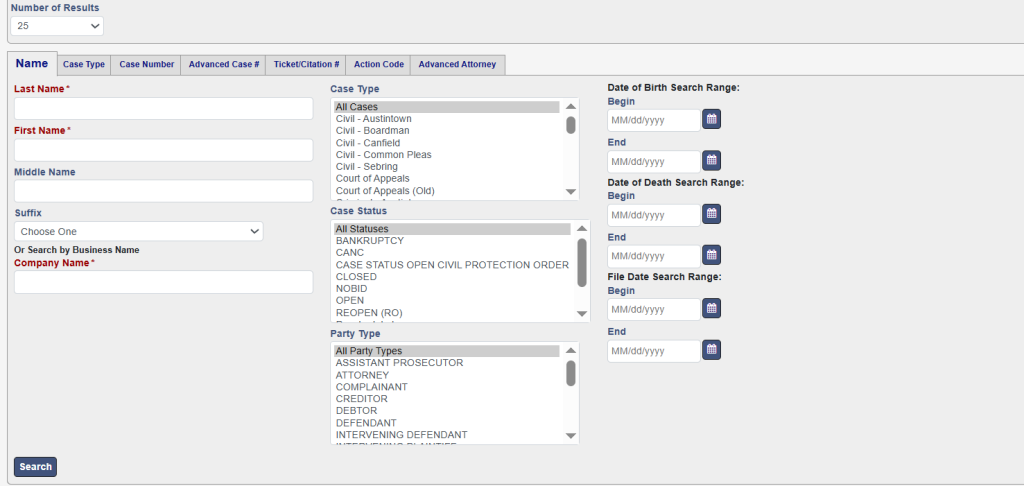
Mahoning County court cases can be searched through the official eCourts system by using a name, case number, or limited filters. The system shows civil, criminal, and domestic relations records with docket details and case status updates. Users can open the eCourts search page, enter case information, and view official Mahoning County Court records in a few steps. The portal works as a centralized court case lookup system for Mahoning County records.
The Mahoning County eCourts system works as the main online court record search portal for public case data. It collects case information from different court divisions and displays it in a single searchable format. This online docket search system helps users check case activity without visiting the courthouse. It shows updated filings, hearings, and case movement history for eligible public records.
What the system includes:
- Civil case records
- Criminal case filings
- Domestic relations cases
- Case status updates
- Hearing schedules
Open the Official Case Search Page
Users start by opening the Mahoning County eCourts search portal: https://ecourts.mahoningcountyoh.gov/eservices/search.page.3
This page works as the main entry point for the case lookup system. It loads the search form where users can enter details for a court record search.
Select Search Method
The system supports multiple search options depending on available information.
Available search types:
- Party Name Search Court Records (most common)
- Docket Number Search Ohio (fastest method)
- Limited filters like city or case category
Each method connects to the same legal case tracking system but uses different inputs.
Perform Party Name Search
Party name search helps find cases linked to a person or business name.
Steps:
- Enter your first name in the field
- Enter your last name in the field
- Add city if required
- Click the search button
- Review matching results
The system may show multiple results for common names, so selecting the correct record is important.
Use Docket Number Search
Docket number search in Ohio is the most direct way to find a case.
Each case has a unique docket ID assigned by the court.
Steps:
- Enter the full docket number
- Click search
- Open the exact case record
This method works best for attorneys or users tracking a specific case.
View Case Details
After selecting a case, the system opens a detailed record page.
Users can view:
- Case status (open, closed, pending)
- Filing history and motions
- Hearing dates and court events
- Party roles (plaintiff, defendant)
- Judge and court division
This section supports full case tracking of Mahoning County records in one place.
Understand Search Results
Search results may include multiple case types in one list. Users should carefully select the correct entry based on:
- Case number match
- Court division
- Filing date
This helps avoid selecting incorrect records in the case lookup system.
Check Record Limitations
Some records may not appear fully online due to legal restrictions.
Common limitations include:
- Sealed or confidential cases
- Juvenile court records
- Partial document visibility
- Older archived cases
For full legal copies, users may need to contact the Clerk of Courts’ office.
Types of Court Cases You Can Search
Mahoning County court case search tools allow public users to review several categories of legal records through the official eCourts platform. The case lookup in the Mahoning County system organizes records by court division, case number, and filing category for faster searches. Users can review court docket activity, hearing schedules, and filing history connected to active or closed proceedings. The online court docket search on the Mahoning County portal supports criminal, civil, probate, domestic relations, and traffic case searches through one searchable database used for public court record review.
Criminal Cases
Mahoning County criminal court records contain information related to felony and misdemeanor proceedings handled by county courts. These records often include criminal charges, arraignment hearings, bond details, plea activity, and sentencing updates connected to a defendant’s case history. The court docket search in the Mahoning County system allows users to monitor case progress through official docket entries and hearing schedules. Some felony case records remain publicly visible unless sealed by court order, though expunged matters or juvenile proceedings may not appear in online search results.
Common criminal case records include:
- Felony case records
- Misdemeanor court records
- Bond hearings
- Sentencing entries
- Criminal complaint filings
Civil Lawsuits
Civil litigation cases involve disputes between people, businesses, landlords, or organizations seeking legal resolution through county courts. The Mahoning County court case search system displays filings connected to contract disputes, property matters, injury claims, and debt collection proceedings. Users can review motions, hearing dates, judgments, and party information through the online docket platform. Civil case records often help attorneys, researchers, and property investigators review ongoing or completed litigation within Mahoning County courts for legal reference and public record verification purposes.
Common civil lawsuit records include:
- Property disputes
- Debt collection cases
- Contract lawsuits
- Personal injury claims
- Small claims matters
Traffic Violations
Traffic court records include legal proceedings connected to driving violations and roadway offenses handled within county or municipal courts. The case lookup Mahoning County system allows users to review citation details, scheduled hearings, fine status, and final court outcomes connected to traffic matters. Some driving offenses may appear under misdemeanor court records if criminal charges are involved. Court docket search Mahoning County tools help drivers verify pending cases, payment obligations, and hearing schedules through public traffic court databases maintained by the county judicial system.
Traffic case examples include:
- Speeding violations
- Reckless driving charges
- License suspension matters
- Driving without insurance
- Parking-related offenses
Probate Matters
Probate case files involve legal proceedings connected to estates, wills, guardianship matters, and conservatorship administration within county probate courts. The Mahoning County court case search platform may display probate filings, hearing dates, estate activity, and court actions linked to inheritance-related proceedings. Probate records help attorneys, beneficiaries, and financial professionals review estate administration activity through official county court systems. Some probate documents may remain partially restricted depending on court privacy rules or the sensitive nature of guardianship and family estate matters.
Probate records may include:
- Estate administration cases
- Guardianship proceedings
- Will filings
- Conservatorship matters
- Trust disputes
Domestic Relations Cases
Domestic relations records involve family-related legal matters handled through family courts in Ohio. These cases commonly include divorce proceedings, child custody disputes, child support matters, parenting schedules, and spousal support modifications. The court docket search in the Mahoning County system allows users to review hearing dates, court motions, and case status information related to family court proceedings. Some family court records Ohio systems restrict sensitive details involving minors or confidential filings, though public docket activity may still remain visible within the online court database.
Domestic relations case records may include:
- Divorce filings
- Child custody disputes
- Child support cases
- Parenting schedule matters
- Spousal support proceedings
How to Search by Name
Mahoning County party name search court records tools allow users to locate cases using a plaintiff’s or defendant’s name within the official eCourts database. The case lookup in the Mahoning County system supports name-based case search methods for civil, criminal, probate, and domestic relations records through a searchable online court portal.
Searching Plaintiffs or Defendants
The defendant search system helps users locate court records connected to a person, business, or organization involved in a legal case. Users enter a first name, last name, or partial business name into the search fields to review matching records stored within the court database. Plaintiff record lookup tools commonly display case numbers, filing dates, court divisions, and hearing activity connected to the selected case. Accurate spelling improves search results and reduces unrelated records appearing within the online case lookup system.
Information commonly shown in results:
- Plaintiff and defendant names
- Case numbers
- Filing dates
- Court division details
- Case status updates
Handling Common Names in Search Results
Common names often produce multiple matching records within the name-based case search system. Users searching names like “John Smith” or “Michael Johnson” may receive large result lists from different court divisions and filing periods. The case lookup Mahoning County platform allows users to narrow searches by reviewing middle initials, filing dates, case categories, or related city information when available. Careful result review helps avoid selecting incorrect court records connected to another person with a similar or identical name.
Ways to narrow common-name searches:
- Use full legal names
- Add middle initials if known
- Review filing dates carefully
- Check court division details
- Compare city or address information
Filtering Results Effectively
The Mahoning County defendant search system includes filtering tools that help users refine court record searches more efficiently. Filters may allow sorting by case type, filing year, or court division to reduce unrelated matches from broader searches. Plaintiff record lookup systems work more accurately when users combine multiple search details instead of entering only one general name. Effective filtering improves search speed and helps users locate the correct docket entry, hearing schedule, or case status information within the online court record database.
Common filtering options include:
- Civil or criminal case type
- Filing year selection
- Court division filters
- Exact name matching
- Docket-related search terms
How to Search by Docket Number
Mahoning County court case search tools allow users to locate records quickly through docket number search methods within the official eCourts database. The court file number system connects every legal proceeding to a unique case ID, helping users perform faster and more accurate searches across court records.
Importance of Docket Numbers
A docket number works as the official legal tracking ID assigned to a court case after filing. The Mahoning County court case search system uses these numbers to organize records, filings, hearing schedules, and judicial activity connected to each proceeding. Unlike name-based searches, docket number search methods reduce confusion caused by similar names or duplicate entries within the database. Courts use this court file number system to maintain accurate case tracking for criminal charges, civil lawsuits, probate matters, and domestic relations proceedings handled through county courts.
Docket numbers help users:
- Identify exact court cases
- Avoid duplicate name results
- Track filing activity
- Review hearing schedules
- Locate court documents faster
Faster and More Accurate Results
Docket number search methods provide direct results since the legal tracking ID links to one specific court record. Users entering the correct case ID lookup number usually reach the matching docket page immediately without scrolling through multiple search entries. This process improves search accuracy and reduces the time needed to locate hearings, motions, judgments, or filing history within the Mahoning County court case search system. Attorneys, researchers, and residents often use docket-based searches for ongoing case tracking and official court record verification purposes.
Benefits of docket searches include:
- Faster case retrieval
- More accurate search results
- Direct case file opening
- Reduced search errors
- Better legal record tracking
Where to Find Docket Numbers
Users can usually locate docket numbers on court paperwork, hearing notices, legal filings, traffic citations, or previous court records connected to a case. The court file number system may contain numbers formatted by filing year, court division, and case category for easier identification within the database. Attorneys often reference these legal tracking IDs in motions, summons notices, and official legal correspondence. If a docket number is unavailable, users may first perform a party name search through the Mahoning County court case search portal to identify the correct case ID lookup number.
Common places where docket numbers appear:
- Court summons documents
- Traffic tickets
- Hearing notices
- Clerk of Courts paperwork
- Previous online case records
Court Docket Information
Court docket search in Mahoning County systems provides detailed records showing the progress and activity of legal proceedings within the county courts. The Mahoning County case search online portal displays filings, hearings, court actions, and status updates connected to each case through a structured legal proceedings record system.
Case Filings and Court Documents
Court docket records contain filings submitted by attorneys, prosecutors, plaintiffs, defendants, and court clerks during a legal proceeding. These filings help create a complete case timeline showing how a matter progresses through the court system from the initial complaint through final resolution. The Mahoning County case search online platform may display motions, affidavits, complaints, summons notices, judgments, and related legal entries connected to a specific case number. Filing records help users monitor court activity and verify procedural actions connected to civil or criminal proceedings.
Common filings shown in docket records include:
- Complaints and petitions
- Motions and responses
- Court orders
- Judgment entries
- Summons notices
Court Hearings and Scheduled Events
The court hearing schedule section displays upcoming and past hearings connected to a case within the online docket system. Users can review hearing dates, courtroom assignments, and scheduled proceedings through the Mahoning County court docket search platform. This legal proceedings record helps attorneys, litigants, and public users monitor important court appearances and filing deadlines. Some records may include event descriptions such as arraignments, pretrial hearings, sentencing hearings, or motion review sessions connected to active court cases.
Court events commonly listed include:
- Arraignment hearings
- Pretrial conferences
- Motion hearings
- Trial dates
- Sentencing proceedings
Judge Notes and Court Actions
Court dockets may include judge-assigned entries or official court actions recorded during legal proceedings. These updates help create a detailed case timeline showing rulings, scheduling decisions, continuances, or procedural activity connected to the matter. The Mahoning County case search online portal may display abbreviated notes entered by the court clerk after hearings or judicial review sessions. Some records contain limited summaries rather than full written opinions, depending on court policies and public record visibility restrictions.
Judge-related docket entries may include:
- Hearing continuances
- Scheduling orders
- Motion rulings
- Judicial assignments
- Court directives
Case Status Updates
Case status updates help users track whether a proceeding remains active, pending, dismissed, or closed within the legal system. The court docket search in the Mahoning County database updates status entries as filings, hearings, or judicial actions occur throughout the case lifecycle. These updates help users monitor ongoing proceedings through the official legal proceedings record platform without visiting the courthouse directly. Status records often appear near the top of the docket page for easier case tracking and quick review of current court activity.
Common case status labels include:
- Open
- Pending
- Closed
- Dismissed
- Resolved
How Often Court Records Are Updated
Mahoning County court case search systems are updated on a regular schedule, but the timing depends on the court division and data entry process. Most online court record access Ohio systems refresh case status updates daily, while some entries may appear after short delays depending on the clerk’s processing time and database synchronization cycles.
Update Frequency of Court Records
Court records in the Mahoning County court case search system are generally updated on a daily basis, especially for active cases in civil and criminal courts. Some divisions may push updates multiple times per day, while others follow a single end-of-day update cycle. The online court record access Ohio platform reflects changes once clerks enter filings, hearings, or judgments into the official system. Real-time court updates are not always guaranteed, since each entry must pass through a verification and recording process before appearing online.
Typical update timing:
- Civil cases: daily updates
- Criminal cases: daily or next-day updates
- Probate cases: periodic updates
- Traffic cases: batch updates
Why Updates May Be Delayed
Database refresh cycles depend on clerical workload, system processing time, and court schedules. Case status updates may not appear instantly because court staff must first process physical or digital filings before entering them into the system. In some situations, weekends, holidays, or high case volumes can slow down updates in the Mahoning County court case search system. Technical synchronization between court departments can also affect how quickly new information appears in the public docket search platform.
Common reasons for delays:
- High volume of court filings
- Weekend or holiday closures
- Manual data entry processing
- Inter-department verification steps
- System synchronization delays
Real-Time Updates vs Scheduled Refresh Cycles
Most online court systems in Ohio do not operate as fully real-time platforms. Instead, they rely on scheduled database refresh cycles that update records at set intervals. The Mahoning County court case search system may display near real-time data for active hearings or filings, but official updates still depend on clerk verification. This ensures accuracy in legal records while maintaining consistency across court departments. Users should expect slight delays between courtroom activity and online visibility of case information.
Update comparison:
- Real-time updates: limited availability
- Same-day updates: common
- Next-day updates: frequent
- Multi-day delays: rare but possible
Case Status Update Timing
Case status changes such as “open,” “pending,” or “closed” are updated once the court officially records a decision or procedural change. These updates are usually reflected after filings are processed and entered into the system. The Mahoning County court case search platform updates case status after clerk review, meaning users may see a short delay between a court event and its online appearance. This structured update process helps maintain accuracy and legal reliability across all court records in Ohio.
Common status update triggers:
- Filing acceptance
- Court rulings
- Hearing completion
- Case dismissal or closure
- Sentencing or judgment entry**
Frequently Asked Questions
Mahoning County court case search systems allow public users to review court records, docket details, and case status updates through the official online portal. These FAQs explain how search methods work, what information appears in records, and how court data is maintained under Ohio public records law and court transparency system rules.
How do I search Mahoning County court case records?
Mahoning County court case search records can be checked through the official eCourts system using a name, case number, or docket ID. Users enter details into the search fields and review matching civil, criminal, probate, or domestic relations records. The search court cases in Ohio process shows case status, filings, and hearing schedules within seconds after submitting a valid query. Results depend on correct input and court division selection.
Can I search court cases by name in Ohio?
Yes, Ohio allows name-based case searches through public court databases, including Mahoning County systems. Users can search for plaintiffs or defendants by entering first and last names into the case lookup tool. Common names may return multiple results, so filters like filing year or case type help refine searches. This legal case accessibility feature supports public review under Ohio public records law.
What is included in the Mahoning County court docket?
The Mahoning County court docket includes detailed legal proceedings records such as case filings, motions, hearing schedules, judge entries, and case status updates. Each docket shows a full case timeline from filing to resolution. Users reviewing Mahoning County court case search results can track legal activity, court decisions, and upcoming hearings through the official docket system used by county courts.
Are court records public in Mahoning County?
Yes, most court records in Mahoning County are public under Ohio public records law. This includes civil, criminal, and traffic case information available through online court databases. However, some records such as juvenile cases, sealed filings, or sensitive family court matters may have restricted access. The court transparency system balances public access with privacy protections required by law.
How do I find a docket number for a case?
A docket number can be found on official court documents such as summons, hearing notices, traffic tickets, or prior case records. It is a unique legal identifier used in the Mahoning County court case search system to track a specific case. If unavailable, users can perform a name search first, then open the case record to locate the docket ID within the case details page.
How often are court records updated?
Mahoning County court records are typically updated daily, depending on the court division and clerk processing time. Civil and criminal cases often reflect next-day updates, while probate or traffic records may follow scheduled batch updates. The search court cases Ohio system relies on database refresh cycles rather than instant updates, so minor delays between court activity and online visibility are normal.